> ## Documentation Index
> Fetch the complete documentation index at: https://developers.scrunch.com/llms.txt
> Use this file to discover all available pages before exploring further.
# Install the Scrunch Data Studio Connector (v2)
> Install and configure the Scrunch Data Studio v2 connector to compare up to 30 brands side by side in Looker Studio and pull in agent traffic data.
# Data Studio Connector (v2)
The v2 connector is built for agencies and multi-brand organizations. Connect all your brands to a single Looker Studio data source, compare visibility side by side, and optionally pull in agent traffic data — all without juggling separate connectors per brand.
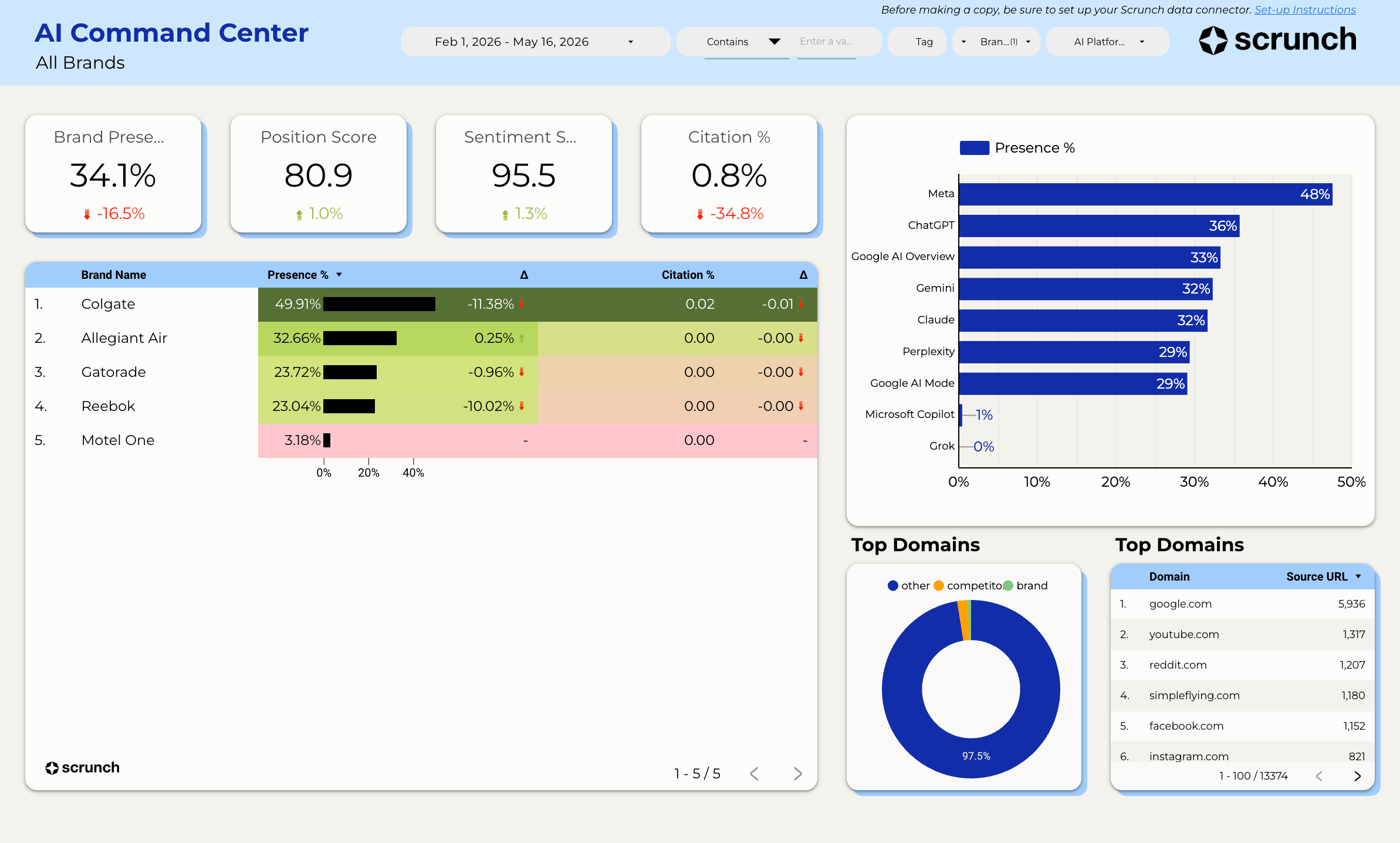 **What's new in v2:**
* **Multi-brand support** — connect 1 to 30+ brands in a single data source
* **Agent Traffic data** — see which AI bots are crawling your site, how often, and where
* **Comparison fields** — brand vs. competitor presence in a single chart
* **Smarter caching and parallel fetching** — faster dashboards, even at scale
Looking for the original single-brand connector? See the [v1 Looker Studio guide](/integrations/looker-studio).
# Install the Scrunch Data Connector
The connector is not yet in the public gallery. Install it directly using the link below:
Open the Scrunch Data Studio Connector
## Configure Your Connection
When you open the connector, you'll see a configuration screen with the following fields:
Paste your Scrunch API key. You can provision one from:
**Scrunch** → **Organization** → **Settings** → **API Keys**
When Data Studio shows the parameter checkboxes, **do not** check **"Allow 'API Key' to be modified in reports."** This prevents your key from being exposed to report viewers.
It is safe to check the override boxes for the other parameters:
* Allow "Brand IDs" to be modified in reports
* Allow "Site ID (optional)" to be modified in reports
* Allow "Path Filter (optional)" to be modified in reports
These let report viewers customize which brands and data slices they see without exposing your API key.
Enter one or more brand IDs, separated by commas. For example: `46,47,48`
To find a brand ID, open the brand in Scrunch and look at the URL:
`https://app.scrunchai.com/org/.../b/1234/dashboard`
Here, `1234` is your Brand ID.
For agency dashboards, enter all client brand IDs here. The connector fetches them in parallel and labels each row with the brand name automatically.
If you want agent traffic data (which AI bots are crawling your site), enter your Site ID.
Leave this blank if you only need AI visibility metrics (presence, position, sentiment).
You can find your Site ID in **Scrunch** → **Brand** → **Agent Traffic**. The Site ID can be quickly found in the URL → [https://app.scrunchai.com/org/](https://app.scrunchai.com/org/) ... /sites/**\{site\_id}**\
\
*If you haven't set up Agent Traffic yet, skip this for now.*
Restrict agent traffic results to a specific URL path prefix (e.g., `/blog` to only see bot traffic to your blog). Leave blank to include all paths.
Path Filter is your friend on high-traffic sites — narrowing a chart to one section (like `/blog/`) makes the Agent Traffic API respond much faster and helps with the timeout errors covered in the [troubleshooting guide](/integrations/data-studio-troubleshooting).
Time bucketing is automatic — the connector picks daily or weekly aggregation based on whichever date dimension you put on the chart (`Date` for daily, `Date Week` for weekly). You don't need to configure it.
Click **Connect** in the top right. Data Studio will load the schema and you're ready to build.
## Available Fields
The connector combines fields from two Scrunch APIs. Data Studio automatically routes your chart to the right API based on which fields you use.
You cannot mix Query API fields and Agent Traffic fields in the same chart. Use separate charts for each. The connector will show a clear error message if you accidentally combine them.
### Query API Dimensions
| Name | Type | Semantic Type | Notes |
| ---------------------------- | ------- | ---------------- | ------------------------------------------------------ |
| `brand_id` | NUMBER | NUMBER | Numeric brand identifier |
| `brand_name` | STRING | TEXT | Auto-resolved from Scrunch API |
| `date` | STRING | YEAR\_MONTH\_DAY | |
| `date_month` | STRING | YEAR\_MONTH | |
| `date_week` | STRING | YEAR\_WEEK | |
| `prompt_id` | NUMBER | NUMBER | |
| `prompt` | STRING | TEXT | |
| `source_url` | STRING | URL | |
| `source_type` | STRING | TEXT | Brand, Competitor, Other |
| `persona_id` | NUMBER | NUMBER | |
| `persona_name` | STRING | TEXT | |
| `competitor_id` | NUMBER | NUMBER | |
| `competitor_name` | STRING | TEXT | |
| `ai_platform` | STRING | TEXT | ChatGPT, Perplexity, Google AI Overviews, Meta, Claude |
| `ai_platform_search_enabled` | BOOLEAN | BOOLEAN | |
| `tag` | STRING | TEXT | |
| `branded` | BOOLEAN | BOOLEAN | Whether the prompt includes brand name(s) |
| `stage` | STRING | TEXT | |
| `prompt_topic` | STRING | TEXT | |
| `country` | STRING | TEXT | |
### Query API Metrics
| Name | Type | Semantic Type | Notes |
| -------------------------------- | ------ | ------------- | ---------------------------------------------------- |
| `responses` | NUMBER | NUMBER | Count of AI responses |
| `brand_presence_percentage` | NUMBER | PERCENT | Share of AI responses where your brand was mentioned |
| `brand_position_score` | NUMBER | NUMBER | Range: 1-100 |
| `brand_sentiment_score` | NUMBER | NUMBER | Range: 1-100 |
| `competitor_presence_percentage` | NUMBER | PERCENT | Requires a competitor dimension |
Looking for a brand citation rate? The dedicated field was removed because it duplicated `brand_presence_percentage`. To compute the true share of responses where your brand appears as a *source URL*, see [How to track brand citation rate](/integrations/data-studio-troubleshooting#how-to-track-brand-citation-rate) in the troubleshooting guide.
### Comparison Fields
These virtual fields let you compare brand and competitor presence in a single chart. When you add `entity_name` as a breakdown dimension, the connector automatically splits each row into a brand row and a competitor row.
| Name | Type | Semantic Type | Notes |
| --------------------- | ------ | ------------- | ----------------------------------------------------------------- |
| `entity_name` | STRING | TEXT | Brand name or competitor name |
| `entity_type` | STRING | TEXT | "Brand" or "Competitor" — use to filter or color-code |
| `presence_percentage` | NUMBER | PERCENT | Unified presence metric (brand or competitor depending on entity) |
To build a brand vs. competitor comparison chart: use `entity_name` as your dimension, `presence_percentage` as your metric, and optionally filter or color by `entity_type`.
### Agent Traffic Dimensions
These fields are only available when a Site ID is configured.
| Name | Type | Semantic Type | Notes |
| -------------- | ------ | ---------------- | ------------------------------------------------------------------------------------------------------------- |
| `date` | STRING | YEAR\_MONTH\_DAY | Daily aggregation. Use this for daily charts. |
| `date_week` | STRING | YEAR\_WEEK | Weekly aggregation. Use this for weekly charts — the connector switches the API to weekly mode automatically. |
| `site` | STRING | TEXT | The site being crawled |
| `path` | STRING | TEXT | URL path. On high-traffic sites, pair with a Path Filter to keep queries fast (see troubleshooting). |
| `agent_source` | STRING | TEXT | Bot identifier (e.g., GPTBot, ClaudeBot). High cardinality — keep date ranges short on busy sites. |
| `agent_type` | STRING | TEXT | Category of agent (training, retrieval, indexer) |
Monthly aggregation isn't available for agent traffic data yet. Use `Date Week` for the closest equivalent.
### Agent Traffic Metrics
| Name | Type | Semantic Type | Notes |
| ---------------- | ------ | ------------- | ------------------ |
| `agent_requests` | NUMBER | NUMBER | Number of requests |
## Multi-Brand Dashboards
The v2 connector is designed for comparing brands side by side. Here are some tips:
* **Use `brand_name` as a dimension** to break down any metric by brand
* **Use `brand_id` for filtering** when you want to isolate a specific brand in a chart
* **Comparison fields** (`entity_name`, `entity_type`, `presence_percentage`) work per-brand — each brand's competitors are included automatically
Brand names are automatically resolved from your Scrunch organization. If you see numeric IDs instead of names, make sure your API key has access to the brands you've configured.
**What's new in v2:**
* **Multi-brand support** — connect 1 to 30+ brands in a single data source
* **Agent Traffic data** — see which AI bots are crawling your site, how often, and where
* **Comparison fields** — brand vs. competitor presence in a single chart
* **Smarter caching and parallel fetching** — faster dashboards, even at scale
Looking for the original single-brand connector? See the [v1 Looker Studio guide](/integrations/looker-studio).
# Install the Scrunch Data Connector
The connector is not yet in the public gallery. Install it directly using the link below:
Open the Scrunch Data Studio Connector
## Configure Your Connection
When you open the connector, you'll see a configuration screen with the following fields:
Paste your Scrunch API key. You can provision one from:
**Scrunch** → **Organization** → **Settings** → **API Keys**
When Data Studio shows the parameter checkboxes, **do not** check **"Allow 'API Key' to be modified in reports."** This prevents your key from being exposed to report viewers.
It is safe to check the override boxes for the other parameters:
* Allow "Brand IDs" to be modified in reports
* Allow "Site ID (optional)" to be modified in reports
* Allow "Path Filter (optional)" to be modified in reports
These let report viewers customize which brands and data slices they see without exposing your API key.
Enter one or more brand IDs, separated by commas. For example: `46,47,48`
To find a brand ID, open the brand in Scrunch and look at the URL:
`https://app.scrunchai.com/org/.../b/1234/dashboard`
Here, `1234` is your Brand ID.
For agency dashboards, enter all client brand IDs here. The connector fetches them in parallel and labels each row with the brand name automatically.
If you want agent traffic data (which AI bots are crawling your site), enter your Site ID.
Leave this blank if you only need AI visibility metrics (presence, position, sentiment).
You can find your Site ID in **Scrunch** → **Brand** → **Agent Traffic**. The Site ID can be quickly found in the URL → [https://app.scrunchai.com/org/](https://app.scrunchai.com/org/) ... /sites/**\{site\_id}**\
\
*If you haven't set up Agent Traffic yet, skip this for now.*
Restrict agent traffic results to a specific URL path prefix (e.g., `/blog` to only see bot traffic to your blog). Leave blank to include all paths.
Path Filter is your friend on high-traffic sites — narrowing a chart to one section (like `/blog/`) makes the Agent Traffic API respond much faster and helps with the timeout errors covered in the [troubleshooting guide](/integrations/data-studio-troubleshooting).
Time bucketing is automatic — the connector picks daily or weekly aggregation based on whichever date dimension you put on the chart (`Date` for daily, `Date Week` for weekly). You don't need to configure it.
Click **Connect** in the top right. Data Studio will load the schema and you're ready to build.
## Available Fields
The connector combines fields from two Scrunch APIs. Data Studio automatically routes your chart to the right API based on which fields you use.
You cannot mix Query API fields and Agent Traffic fields in the same chart. Use separate charts for each. The connector will show a clear error message if you accidentally combine them.
### Query API Dimensions
| Name | Type | Semantic Type | Notes |
| ---------------------------- | ------- | ---------------- | ------------------------------------------------------ |
| `brand_id` | NUMBER | NUMBER | Numeric brand identifier |
| `brand_name` | STRING | TEXT | Auto-resolved from Scrunch API |
| `date` | STRING | YEAR\_MONTH\_DAY | |
| `date_month` | STRING | YEAR\_MONTH | |
| `date_week` | STRING | YEAR\_WEEK | |
| `prompt_id` | NUMBER | NUMBER | |
| `prompt` | STRING | TEXT | |
| `source_url` | STRING | URL | |
| `source_type` | STRING | TEXT | Brand, Competitor, Other |
| `persona_id` | NUMBER | NUMBER | |
| `persona_name` | STRING | TEXT | |
| `competitor_id` | NUMBER | NUMBER | |
| `competitor_name` | STRING | TEXT | |
| `ai_platform` | STRING | TEXT | ChatGPT, Perplexity, Google AI Overviews, Meta, Claude |
| `ai_platform_search_enabled` | BOOLEAN | BOOLEAN | |
| `tag` | STRING | TEXT | |
| `branded` | BOOLEAN | BOOLEAN | Whether the prompt includes brand name(s) |
| `stage` | STRING | TEXT | |
| `prompt_topic` | STRING | TEXT | |
| `country` | STRING | TEXT | |
### Query API Metrics
| Name | Type | Semantic Type | Notes |
| -------------------------------- | ------ | ------------- | ---------------------------------------------------- |
| `responses` | NUMBER | NUMBER | Count of AI responses |
| `brand_presence_percentage` | NUMBER | PERCENT | Share of AI responses where your brand was mentioned |
| `brand_position_score` | NUMBER | NUMBER | Range: 1-100 |
| `brand_sentiment_score` | NUMBER | NUMBER | Range: 1-100 |
| `competitor_presence_percentage` | NUMBER | PERCENT | Requires a competitor dimension |
Looking for a brand citation rate? The dedicated field was removed because it duplicated `brand_presence_percentage`. To compute the true share of responses where your brand appears as a *source URL*, see [How to track brand citation rate](/integrations/data-studio-troubleshooting#how-to-track-brand-citation-rate) in the troubleshooting guide.
### Comparison Fields
These virtual fields let you compare brand and competitor presence in a single chart. When you add `entity_name` as a breakdown dimension, the connector automatically splits each row into a brand row and a competitor row.
| Name | Type | Semantic Type | Notes |
| --------------------- | ------ | ------------- | ----------------------------------------------------------------- |
| `entity_name` | STRING | TEXT | Brand name or competitor name |
| `entity_type` | STRING | TEXT | "Brand" or "Competitor" — use to filter or color-code |
| `presence_percentage` | NUMBER | PERCENT | Unified presence metric (brand or competitor depending on entity) |
To build a brand vs. competitor comparison chart: use `entity_name` as your dimension, `presence_percentage` as your metric, and optionally filter or color by `entity_type`.
### Agent Traffic Dimensions
These fields are only available when a Site ID is configured.
| Name | Type | Semantic Type | Notes |
| -------------- | ------ | ---------------- | ------------------------------------------------------------------------------------------------------------- |
| `date` | STRING | YEAR\_MONTH\_DAY | Daily aggregation. Use this for daily charts. |
| `date_week` | STRING | YEAR\_WEEK | Weekly aggregation. Use this for weekly charts — the connector switches the API to weekly mode automatically. |
| `site` | STRING | TEXT | The site being crawled |
| `path` | STRING | TEXT | URL path. On high-traffic sites, pair with a Path Filter to keep queries fast (see troubleshooting). |
| `agent_source` | STRING | TEXT | Bot identifier (e.g., GPTBot, ClaudeBot). High cardinality — keep date ranges short on busy sites. |
| `agent_type` | STRING | TEXT | Category of agent (training, retrieval, indexer) |
Monthly aggregation isn't available for agent traffic data yet. Use `Date Week` for the closest equivalent.
### Agent Traffic Metrics
| Name | Type | Semantic Type | Notes |
| ---------------- | ------ | ------------- | ------------------ |
| `agent_requests` | NUMBER | NUMBER | Number of requests |
## Multi-Brand Dashboards
The v2 connector is designed for comparing brands side by side. Here are some tips:
* **Use `brand_name` as a dimension** to break down any metric by brand
* **Use `brand_id` for filtering** when you want to isolate a specific brand in a chart
* **Comparison fields** (`entity_name`, `entity_type`, `presence_percentage`) work per-brand — each brand's competitors are included automatically
Brand names are automatically resolved from your Scrunch organization. If you see numeric IDs instead of names, make sure your API key has access to the brands you've configured.